Timeslicer vs Toggl Track
The obvious framing for this comparison is manual timers against automatic tracking. That framing is wrong, and Toggl's own pricing page disproves it in one click.
Toggl Track has four separate background automation paths, and all four are available on its free tier. The real difference is not whether the tool watches what you do. It is who decides what the watching meant.
The short answer
Choose Toggl Track if you bill clients, need approvals and an audit trail, or need finished security certifications. It is a mature, complete product and its free tier is genuinely generous.
Choose Timeslicer if the labelling is the part that keeps failing. Toggl records your activity and waits for you to say what it was. Timeslicer works that out and shows you the answer.
Toggl Track facts here were checked against Toggl's own pricing, support and security documentation on 3 September 2026. Where Toggl contradicts itself, this page says so.
Toggl does track automatically, and you should know that
Plenty of comparison pages claim Toggl is a manual stopwatch. It is not. Verified on Toggl's own pricing matrix, all four of these are on the free tier:
- Desktop Timeline recording, which logs every application and website you view for more than ten seconds.
- Autotracker, which matches keywords against foreground window titles and suggests a timer.
- Browser extension per-page auto-tracking with a dwell threshold.
- Calendar event auto-tracking.
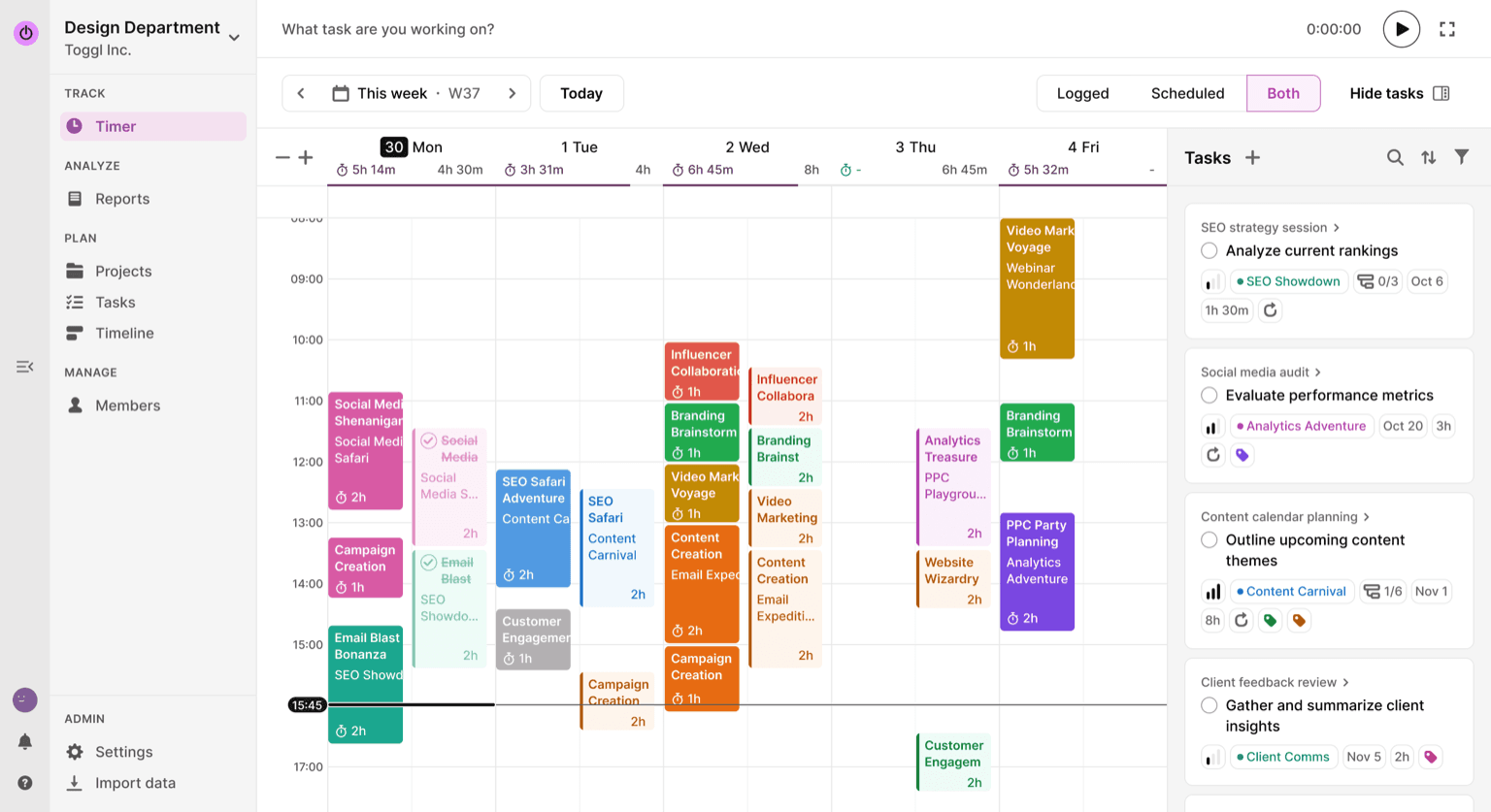
So Toggl sees your day. What it does not do is interpret it. The Timeline is a raw log of applications and window titles, and turning any of it into a time entry is a manual step. Toggl puts this plainly in its own documentation: only you decide which activity turns into time entries.
Who supplies the label
Every label in Toggl comes from a person. The project, the client, the tag, the billable flag and the description are fields you fill in, either when you start a timer or when you write an Autotracker rule. Autotracker matches a string you chose and applies a label you wrote. The software matches. It does not decide.
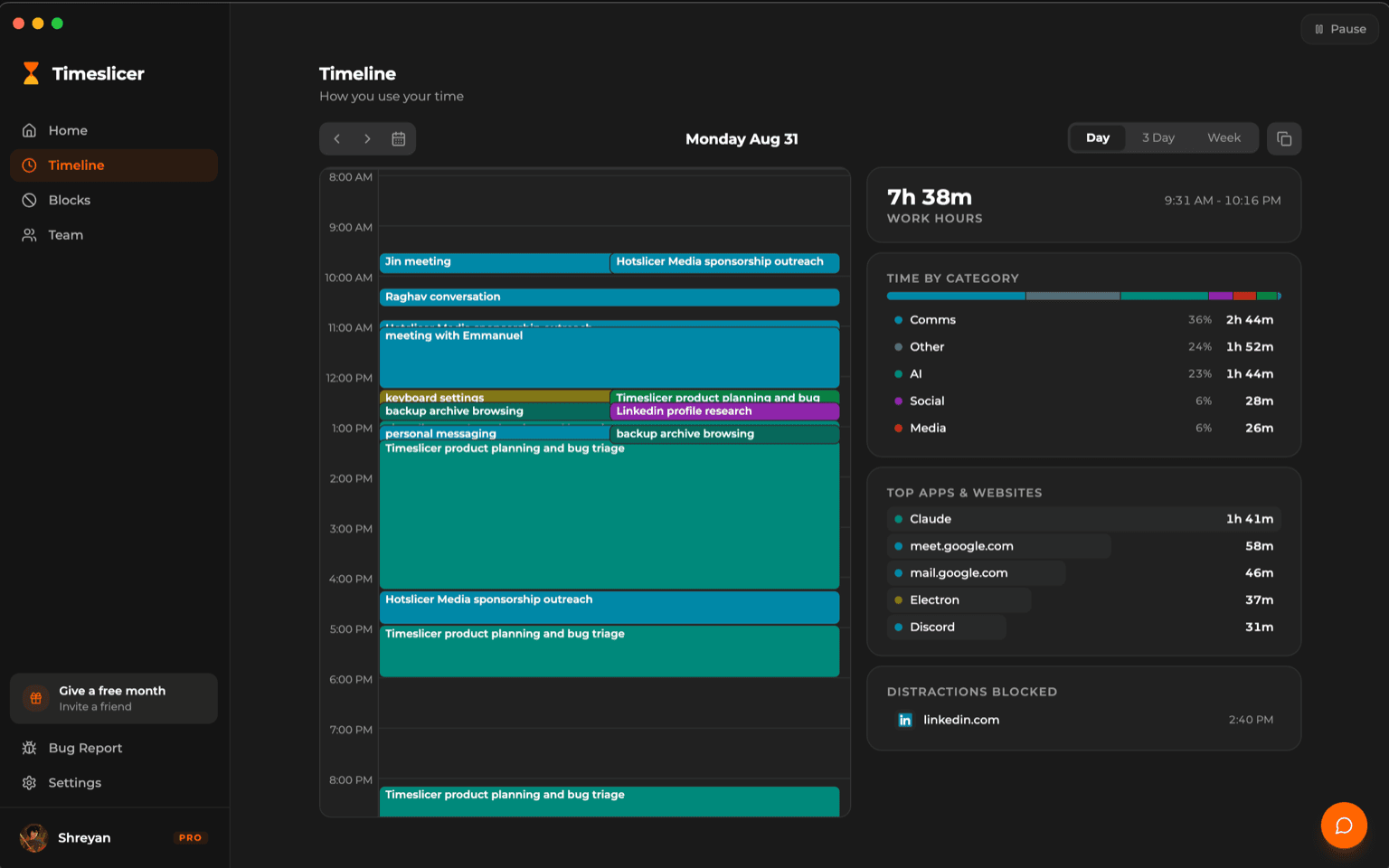
Timeslicer starts from the other end. It reads the content of the front window, groups scattered activity into a coherent piece of work, and names it. Nothing to fill in, no rule to write, no taxonomy to design first.
That is the whole comparison. If designing a project taxonomy and keeping entries tidy already works for you, Toggl does it better than we do and this page is not trying to talk you out of it. If the labelling is the step that quietly stops happening around Wednesday, that is the step Timeslicer removes.
Side by side
| Timeslicer | Toggl Track | |
|---|---|---|
| Captures activity in the background | Yes | Yes, four separate paths, all on the free tier |
| Decides what the activity was | Yes, automatically | No, you supply every label |
| Setup before it is useful | None | Projects, clients, tasks, and Autotracker rules |
| Client billing and invoicing | None | Rates at five levels, retainers, profitability, PDF invoicing |
| Approvals and audit trail | None | Timesheet approvals, audit log, entry locking, required fields |
| Security certifications | None published | ISO 27001:2022 and SOC 2 Type II, both completed |
| Platforms | Mac and Windows | Windows, macOS, iOS, Android, watchOS, three browser extensions |
| Free tier | History, manual blocking, 5 AI blocks per day | Genuinely capable, including all four automation paths and the API |
| AI over your data | Read-only MCP across your history | AI Insights beta, over entries you already created |
| Distraction blocking | Content-described blocking | None |
On privacy, Toggl is strong and deserves the credit
Toggl's Timeline is off by default and opt in. Its recorded activity is invisible to administrators, including the workspace owner. Server-side it is retained for ninety days, it can be run entirely locally with cloud sync disabled, and you can export or delete it yourself.
Toggl also publishes a standalone statement refusing screen recording, keystroke logging, location tracking and webcam monitoring. And its certifications are finished rather than pending, which matters if you are clearing a security questionnaire this quarter.
Timeslicer reads screen content when you enable snapshots, and sends text to Google and OpenAI for inference. Our history stays on your device and our servers never receive it, which is a real difference in the other direction, but on the narrow question of how little a tracker can look at, Toggl looks at less. Our data page sets out the full trade.
What you pay
| Timeslicer | Toggl Track | |
|---|---|---|
| Free tier | History, manual blocking, 5 AI blocks per day | Yes, capable; the user limit is not published |
| Entry paid tier | 6.99 US dollars per month | Starter, 9 annual or 12 monthly, per license |
| Next tier up | None | Premium, 18 annual or 20 monthly, per license |
| Billing unit | Per user | Per license, which is not the same as per active user |
Two details worth knowing before you compare headline numbers. The 14 dollar figure on Toggl's Premium card is a first-year promotion that renews at 18. And Toggl bills per license rather than per active person: deactivating someone leaves their license vacant and still billed until an administrator removes it, which Toggl's own worked example illustrates with twenty licenses billed against seventeen active users.
Where Toggl Track is the better choice
- You bill clients. Billable rates at five levels, historical rates with retroactive changes, labor costs, rounding, fixed-fee and retainer projects, profitability and utilization reporting, and invoicing into QuickBooks. Timeslicer has none of this.
- Your time data has to survive an audit. Multi-layer timesheet approvals, an audit log of who changed what, entry locking after a date, and required fields.
- You need certifications now. ISO 27001:2022 and SOC 2 Type II, both completed.
- You need platform breadth. Including phones and a watch, which Timeslicer does not have at all.
- You want a strong free tier. Toggl's free plan includes all four automation paths and API access.
Where Timeslicer is the better choice
- Labelling is the step that fails. If your Toggl entries are accurate the days you remember and blank the days you do not, the problem is not discipline, it is that the tool needs you present.
- You want the work named, not the project bucket. Two sessions on the same project are two different pieces of work in Timeslicer.
- You want to ask questions of your history. Timeslicer exposes a read-only MCP interface over the whole record. Toggl's AI Insights is an invitation-only beta that queries entries you already made, and Toggl says it will be disabled when the beta ends.
- You want blocking in the same tool. Toggl has none.
Try Timeslicer
Thirty day Pro trial. Mac and Windows.
Sources
Toggl Track claims come from Toggl's own pricing, support and security pages, checked 3 September 2026. Toggl publishes some figures inconsistently, including uptime stated as both 99.9 and 99.99 percent and a billing paragraph that predates its current license rule, so check the live pages before making a decision on a specific number.
Related: Timeslicer vs Rize, Timeslicer vs RescueTime, and how to see what you actually worked on.
Last verified 3 September 2026.