Timeslicer vs Rize
Both track your time automatically, with no timers to start. The difference is what comes out. Rize reports how your hours divide across categories, applications and focus sessions. Timeslicer reports the day as a list of named tasks, like "Timeslicer product planning and bug triage".
The short answer
Choose Timeslicer if you want to know what you and your team actually worked on, without building a project taxonomy first. Task names are automatic, your history stays on your machine, and your AI tools can query it directly.
Choose Rize if tracked time has to become an invoice or a capacity plan. Its billing and resourcing layer is real, and Timeslicer is not trying to build one.
Every Rize fact on this page was checked against Rize's own documentation, pricing and privacy pages on 2 September 2026, and each claim links to its source. Products change. If you are reading this long after that date, check the linked pages.
What each one records
Rize watches which application and website is in front of you and rolls that into categories such as Writing, Documenting and Browsing, plus a Focus Quality score and session breakdown. It also has a full client, project and task model with hourly rates and margin reporting.
That task and project attribution is real, and it is a genuine strength. It is also configuration work. Rize's own documentation describes creating clients, projects and tasks with keywords, connecting a task tracker, reviewing entries daily, and tuning confidence thresholds, and it describes the first week as a training period.
Timeslicer infers the task itself, with nothing to configure. It groups fragmented activity into a named block and still shows the category and application totals underneath. You get everything a category tracker gives you, plus the layer that says which piece of work it was.
The same question, one week each
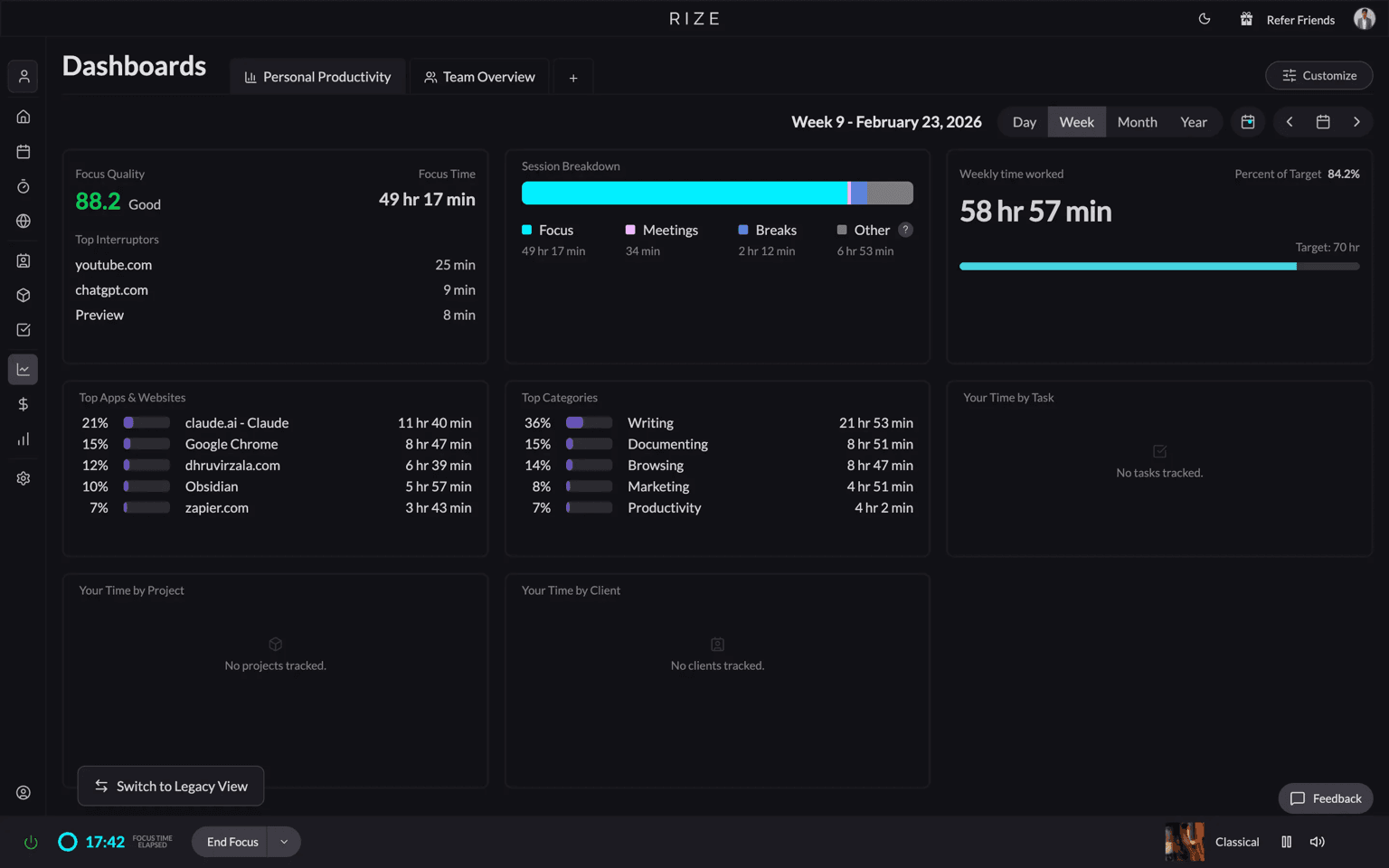
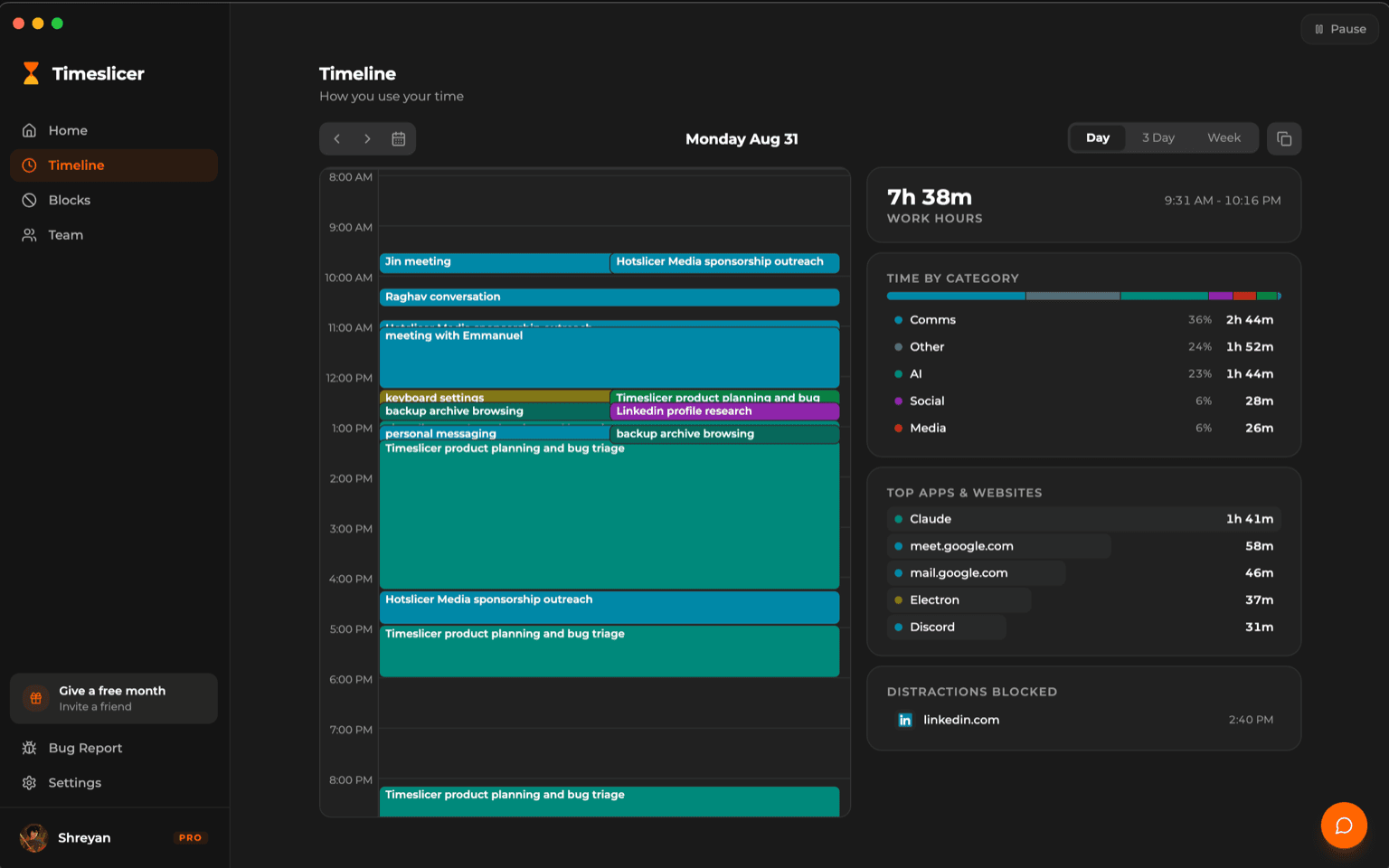
That is the practical difference. After a full working week, an unconfigured Rize account tells you that thirty six percent of your time was Writing. Timeslicer tells you which pieces of writing.
Side by side
| Timeslicer | Rize | |
|---|---|---|
| Names the task you worked on | Automatic, no setup | After configuring clients, projects, tasks and keywords |
| Setup before it is useful | None | Rize documents a first week of training and tuning |
| Where your history is stored | On your device | Rize servers, United States regions only |
| Team view | What each person worked on, as named tasks | Approved time entries and categories |
| AI access to your data | MCP, read only queries | MCP, 72 tools across read and write |
| Distraction blocking | Blocks on a description of content, per page | Blocks on categories, two minute dwell default |
| Free trial | 30 days | 7 days |
| Client billing, rates and invoicing | None | Rates, retainers, budgets, margin reporting |
| Timesheets, resourcing, capacity planning | None | Included |
| Published SOC 2 | None published | Type II in progress, expected late 2026 |
| Linux | No | No, listed as coming soon |
Teams
Most team time trackers report where people were: hours per site, hours per application, a productivity percentage. Managers get an activity readout and still have to guess what the work actually was.
Timeslicer reports what the team worked on. Each person's week is a list of named tasks, so a weekly review starts from the work itself rather than from a category chart. Rize can reach something similar through its client and project model, but that requires the setup described above, maintained by everyone on the team.
The team data is also queryable by your AI tools over MCP, so you can ask where the week actually went across the team instead of assembling it by hand. Timeslicer's MCP is read only, which means it answers questions and changes nothing. Rize's surface is larger and can write back.
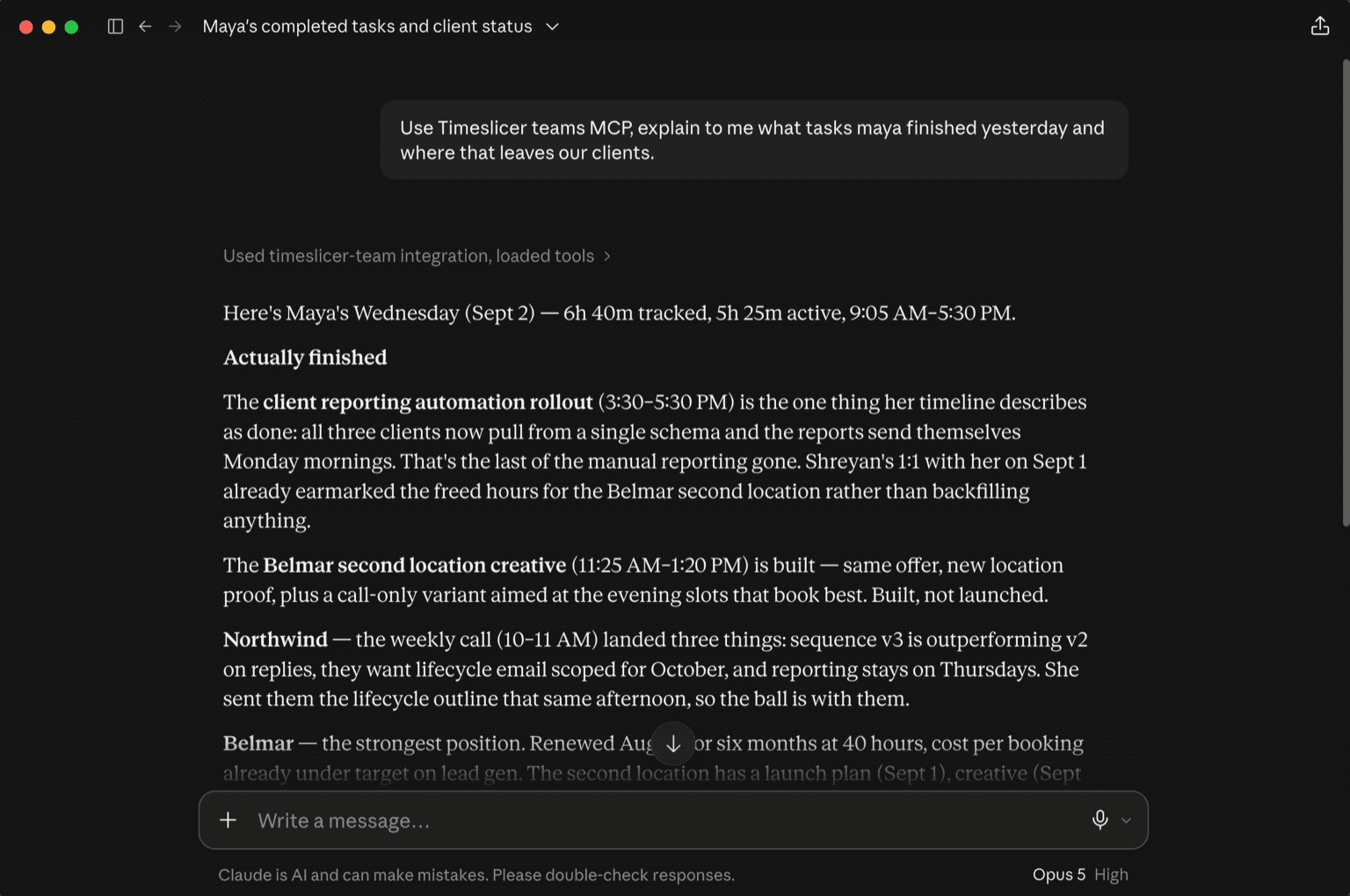
Rize remains the better fit if your team needs timesheets, resourcing and capacity planning, or if you need an approval step where each person reviews entries before an admin sees them. Those are real features and Timeslicer does not have them.
More on Timeslicer for teams.
Where your data goes
Neither product processes your activity entirely on your machine, and any page telling you otherwise is worth distrusting. Both send derived data to third party language models.
Rize transmits window metadata to its own servers, hosted in United States regions, and generates entry descriptions using third party models from Google, Anthropic and OpenAI. Rize states this data is used for inference only and never for training. Your history lives on Rize's servers.
Timeslicer transmits screen derived text, application names and window titles to Google and OpenAI for task inference. Those providers are contractually barred from training on it and delete it within thirty days, and Timeslicer does not store it. Our own privacy policy puts it plainly:
Processing is not local, even though storage is.
Timeslicer Privacy Policy
So the honest difference is not local versus cloud processing. It is storage and retention. Your Timeslicer history stays on your device. Your Rize history is on Rize's servers, which is also what makes Rize's team dashboards and cross device access possible.
On reading screen contents, both products treat it as a choice. Timeslicer's window snapshots are opt in, and Rize's Screen Text feature is opt in. Neither reads what is on your screen unless you turn it on. Rize does not take screenshots or log keystrokes in its standard tracking.
What you pay
| Timeslicer | Rize | |
|---|---|---|
| Trial | 30 day Pro trial | 7 days |
| Paid entry price | 6.99 US dollars per month | 9.99 US dollars per month, billed annually |
| Free tier after the trial | Yes. Keeps your history, manual blocking and 5 AI blocks per day | None |
| Automatic tracking on the free tier | No, this is what Pro pays for | No free tier at all |
| Usage limits on AI features | 5 AI blocks per day on free, unlimited on Pro | 500 to 3000 AI credits per month by tier, unit not published |
| If you stop paying | History kept and exportable, new tracking stops | Access and export kept, new tracking stops |
Both products gate the same thing. Automatic time tracking is what the subscription pays for, on either side, and neither lets you track indefinitely for free. The differences are the trial length and what you are left holding afterwards. Timeslicer gives you thirty days rather than seven, and its free tier remains a permanent home for the history you already built, with manual blocking still working.
Rize has no free tier of any kind. It runs a seven day trial and then requires payment. Rize also publishes different figures across its pricing cards, its FAQ and its structured data, so check the live page before deciding.
One thing Rize does not publish is what an AI credit is. Credits are the only stated difference between its three individual tiers, at five hundred, one thousand and three thousand per month, but no page we could find defines what consumes one or what happens when they run out.
Distraction blocking: two trigger models
Both products block distractions, and anyone telling you Rize does not is wrong. Rize ships a configurable blocker driven by its categories, with a two minute default dwell threshold, active during focus sessions.
Timeslicer blocks on a description of content rather than a list of sites. You write what you do not want to see, and it resolves per page.
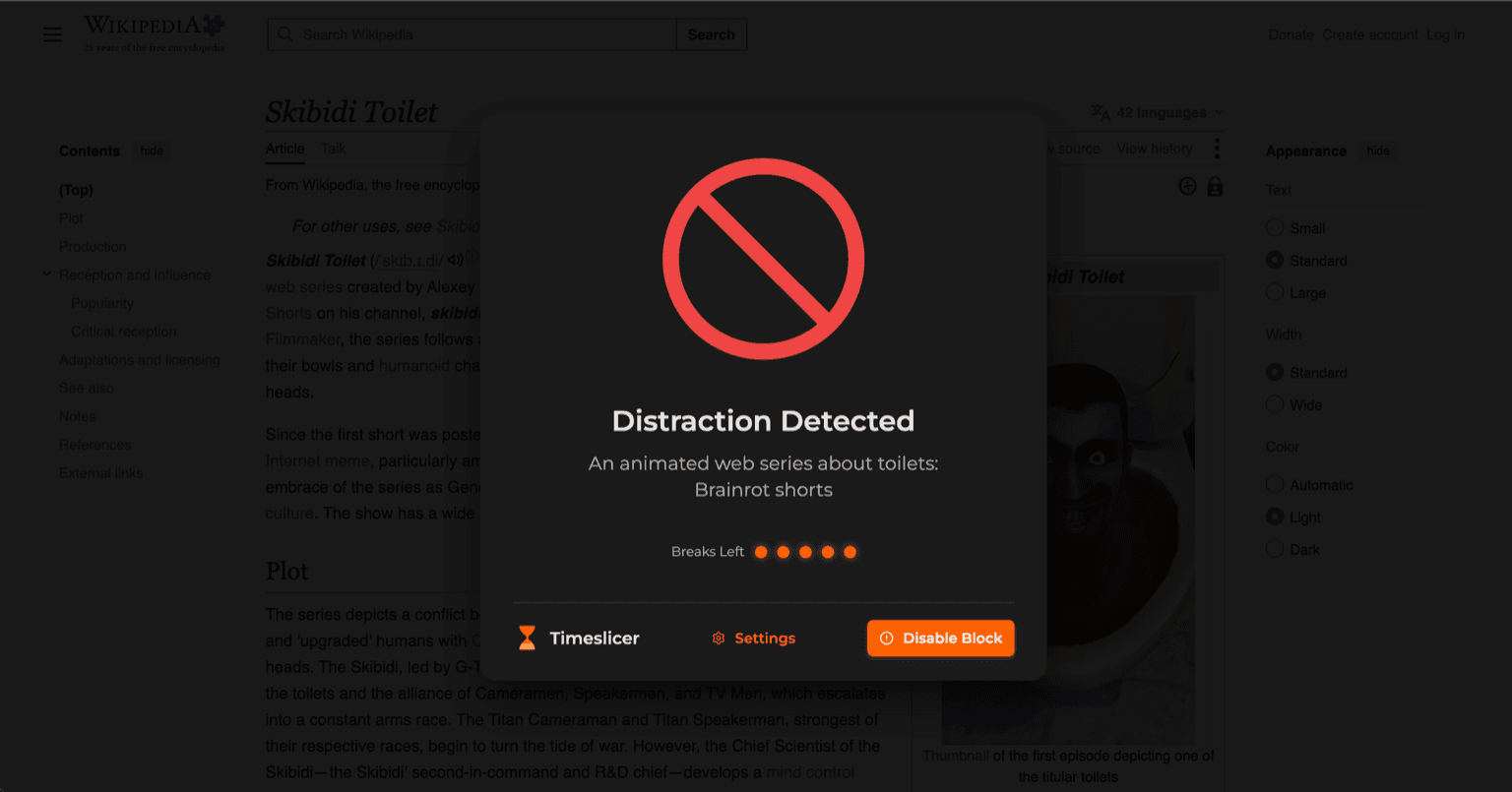
Which is better depends on how you work. A category or domain blocklist is predictable and easy to reason about. A content rule catches things a blocklist misses, and can occasionally block something you wanted.
Where Rize is the better choice
If any of these describe you, Rize is the stronger product and you should use it.
- You bill clients. Rize has hourly and cost rates per client, project and member, billable flags, retainers, budgets, contract profitability and margin reporting. Timeslicer has none of this and no invoicing.
- Your team needs timesheets and capacity planning. Roles, resourcing, scheduled against tracked hours, and an approval step where each person reviews entries before an admin sees them.
- You need security paperwork. Rize publishes a dated security page, annual third party penetration testing, remediation timelines and a DPA. Its SOC 2 Type II is in progress rather than certified, expected late 2026. Timeslicer has no published SOC 2 or third party penetration test.
- You want an assistant that can write back. Rize documents seventy two MCP tools across read and write. Timeslicer's MCP answers questions and changes nothing.
- You want a full focus system. Session timers, a Focus Quality score, planned sessions, break suggestions and a focus music library.
Where Timeslicer is the better choice
- You want task names without setup. No projects, keywords or connected task tracker required before the timeline is useful.
- You would rather your history stayed on your machine. Timeslicer stores it locally and does not retain the text it sends for inference.
- You want to try it for longer than a week. Thirty days against Rize's seven, and no card needed to start.
- You want blocking that follows content. Useful when the distraction lives on a domain you also need for work.
- You run a team and want to see the work, not the sites. Named tasks per person, queryable by your AI tools, with no project taxonomy for the team to maintain.
What neither does well
Neither runs on Linux. Neither will reconstruct time you spent away from the computer without you entering it. Both depend on third party language models to label your activity, which means both occasionally label something wrong, and both are worth reviewing rather than trusting blindly. Timeslicer additionally has no mobile app.
Try Timeslicer
Thirty day Pro trial. Mac and Windows.
Sources
Rize claims on this page come from Rize's own pricing, security, privacy, feature and documentation pages, checked 2 September 2026. Timeslicer claims about data handling come from our privacy policy. We have not reused Rize's published performance statistics, because we could not find a cited source for any of them.
Related reading: all comparisons, how Timeslicer blocks distractions, and Timeslicer for teams.
Last verified 2 September 2026.