Timeslicer vs ActivityWatch
These two products are further apart than most comparisons on this site. ActivityWatch is free, open source, and runs entirely on your machine. Timeslicer is paid software that sends text to model providers. If your requirements are ownership and zero cost, this comparison is short and ActivityWatch wins it.
The reason to read on is the one axis where they genuinely differ in kind rather than in degree: how each one decides what your time was spent on.
The short answer
Choose ActivityWatch if you want to own your raw data forever, run everything locally, extend it with your own watchers, or work on Linux. It is free with no tier, and it will still work if the project stops.
Choose Timeslicer if you want your day named without writing rules, and you accept that this requires sending text off your machine to do it.
ActivityWatch facts here were checked against its official documentation, website and source repositories on 3 September 2026. Where the project contradicts itself, this page says so rather than picking the flattering reading.
Regex rules, or inference
ActivityWatch records which application is in focus, the window title, and browser domains through an extension. To turn that into categories, you write rules. The documentation is direct about the options available:
Currently there are only two rule options for categories: "Regex" or "No rule".
ActivityWatch documentation
Those rules match on the application name and the window title. They do not match on URLs, which the docs note as "not yet URLs", with a documented workaround of injecting the URL into the window title. There is no task inference, no automatic labelling, and no model anywhere in the product.
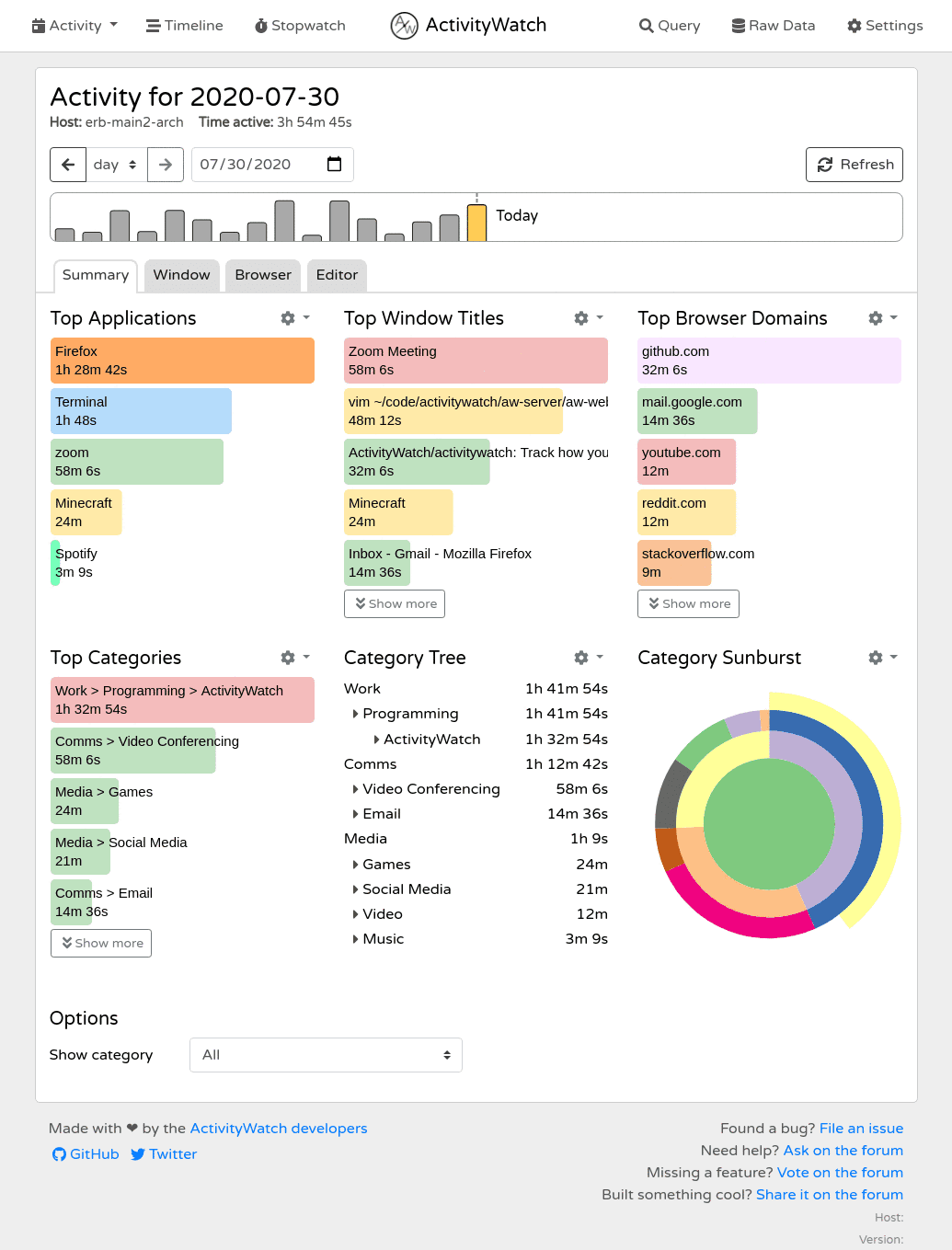
This is a real design position, not a gap. A regex either matches or it does not. You can read every rule, predict every outcome, and reproduce a categorization from two years ago exactly. There is no confidence threshold to tune and no model version that quietly changes behaviour between releases.
The cost is that the quality of your data is the quality of your rules, and you write them. A window titled the same way for two different projects lands in the same bucket. Work that happens in an application you have not written a rule for lands in Uncategorized.
Timeslicer takes the opposite trade. It reads the content of the front window, groups fragmented activity into a named piece of work, and labels it without rules. That is why it can distinguish two sessions in the same editor, and also why it requires sending text to Google and OpenAI to do it. Neither approach is free of cost. They just charge you in different currencies.
Side by side
| Timeslicer | ActivityWatch | |
|---|---|---|
| How time is categorized | Task inference from screen content | Regex rules on app name and window title, or no rule |
| Configuration required | None | You write the rules |
| Names the specific piece of work | Yes | No, categories only |
| Cost | 6.99 US dollars per month for Pro | Free, MPL-2.0, no paid tier |
| Data leaves your device | Text sent to Google and OpenAI for inference | Nothing, except an update check you can disable |
| Linux | No | Yes, first class |
| Extensibility | Read-only MCP interface | REST API, query language, roughly 30 community watchers |
| Projects, clients, billing | None | None |
| Distraction blocking | Content-described blocking | None |
| Team features | Yes | None, and the project declines the monitoring use case |
| Account required | Yes | No |
On price, plainly
ActivityWatch is free under MPL-2.0. There is an optional subscription, and it is worth being precise about what that is, because ActivityWatch's own home page and FAQ do not agree.
The home page mentions Pro subscriptions starting at five dollars a month. The FAQ, on the same site, says there are no premium tiers, no usage limits and no ads. The subscription page resolves it: subscribing unlocks nothing, and states that you already have every feature. It is a donation with a label, not a tier.
So on cost this is not close. ActivityWatch is free forever and Timeslicer charges for automatic tracking. If price is the deciding factor, stop here.
On privacy, ActivityWatch is stronger and also candid about its limits
ActivityWatch stores events in a SQLite file on your machine. Nothing is transmitted except an update check against GitHub, which can be turned off. That is a stronger position than Timeslicer can claim, since Timeslicer sends screen-derived text to two model providers. Our data page sets out exactly what that involves.
The project is also unusually honest about what local does not mean. Its own security documentation states that the local API has no authentication, that the server does not use HTTPS, that data is not encrypted at rest, and that the project has had no security audit because that is out of reach for its resources. It documents a Firefox extension issue where a malicious WebExtension could read the datastore.
Publishing that list is a point in the project's favour, not against it. It does mean local and secure are not synonyms, which matters if you share a machine.
Where ActivityWatch is the better choice
- You want to own the raw event stream. Individual events at full resolution in a file you control, rather than summaries held by a company. Questions you have not thought of yet can be asked of data collected today.
- You want to extend it. A REST API, a query language, client libraries, and around thirty community watchers covering editors, IDEs and stranger things. Nothing commercial in this category comes close.
- You are on Linux. First-class support across several packaging formats. Timeslicer does not run on Linux at all. The caveat is Wayland, where ActivityWatch disables the window watcher entirely.
- You need auditable categorization. Reproducible rules with no model in the path.
- You want no account and no shutdown risk. No sign-up and no server entitlement. If the project stopped, your installed copy keeps running.
Where Timeslicer is the better choice
- You do not want to write rules. This is the whole comparison. Timeslicer produces named tasks on day one with nothing configured.
- You want the specific work, not the category. Two sessions in the same editor on different projects are two different things in Timeslicer and one regex match in ActivityWatch.
- You want distraction blocking in the same tool. ActivityWatch has none, by design.
- You want your AI tools to query your history. Timeslicer exposes a read-only MCP interface. ActivityWatch's documented AI workflow is to export a summary, ask an assistant, and add any suggested rules by hand.
Two more things worth knowing
ActivityWatch is candid that its numbers are estimates. Its FAQ notes that the focused window is not necessarily the window you are attending to, and that keyboard and mouse activity misses passive engagement like reading or watching. Every tracker in this category shares those failure modes. Not every tracker says so.
On release cadence, two dated facts and no interpretation: the last stable release, v0.13.2, was published on 5 October 2024, and v0.14.0 has been in beta since 7 May 2026. The repositories were still receiving commits on 3 September 2026.
Try Timeslicer
Thirty day Pro trial. Mac and Windows, not Linux.
Sources
ActivityWatch claims come from its official documentation, website and public repositories, checked 3 September 2026. We have not repeated its self-reported user count or the rating asserted in its own structured data, on the same basis we apply to every competitor: a number a company asserts about itself without a method is not evidence.
Related: Timeslicer vs Rize, Timeslicer vs RescueTime, and what Timeslicer does with your data.
Last verified 3 September 2026.